为了一键部署 K8s 集群,我决定使用 Sealos 命令行工具。
在日常做运维实验或工作中,不可避免得需要重复部署 K8s 集群。比如:日常运维实验过程中损坏了 K8s 集群,或者资源不够时清理了之前的 K8s 集群现在又需要重新部署。工作中,需要部署私有化交付场景等等,只要是需要部署 K8s 集群的地方,都能采用 Sealos 命令行工具一键实现部署 K8s 集群。
强烈推荐观看B站视频版本:https://www.bilibili.com/video/BV1CU5s62EYZ/
Sealos 介绍
Sealos 是一个基于 Kubernetes 构建的 AI 原生云操作系统,统一了整个应用生命周期,从云集成开发环境(IDE)到生产部署和管理。它非常适合构建和扩展现代人工智能应用、托管数据库(MySQL、PostgreSQL、Redis、MongoDB)以及复杂的微服务架构。
但是我们这里介绍的不是他这个系统,而是它的命令行工具sealos。
Sealos 安装
https://sealos.run/docs/k8s/quick-start/deploy-kubernetes#%E5%85%88%E5%86%B3%E6%9D%A1%E4%BB%B6
# 获取Sealos版本号
VERSION=curl -s https://api.github.com/repos/labring/sealos/releases/latest | grep -oE <span class="hljs-string" style="color: #98c379; line-height: 26px;">'"tag_name": "[^"]+"'</span> | head -n1 | cut -d<span class="hljs-string" style="color: #98c379; line-height: 26px;">'"'</span> -f4
# 配置GitHub代理
export PROXY_PREFIX=https://ghfast.top
# 下载Sealos二进制命令行包
wget ${PROXY_PREFIX}/https://github.com/labring/sealos/releases/download/${VERSION}/sealos_${VERSION#v}_linux_amd64.tar.gz \
  && tar zxvf sealos_${VERSION#v}_linux_amd64.tar.gz sealos && chmod +x sealos && mv sealos /usr/bin
准备环境
# 1)修改主机名
# master节点
hostnamectl set-hostname k8s-master01-192-168-1-53
# node1节点
hostnamectl set-hostname k8s-node01-192-168-1-54

# 2)配置时间同步
#删除centos默认repo包,配置阿里云Centos-7.repo包
rm -rf /etc/yum.repos.d/*
curl -o /etc/yum.repos.d/CentOS-Base.repo https://mirrors.aliyun.com/repo/Centos-7.repo

#方式1:安装配置chrony时间同步
IP=ip addr | grep <span class="hljs-string" style="color: #98c379; line-height: 26px;">'state UP'</span> -A2 | grep inet | egrep -v <span class="hljs-string" style="color: #98c379; line-height: 26px;">'(127.0.0.1|inet6|docker)'</span> | awk <span class="hljs-string" style="color: #98c379; line-height: 26px;">'{print $2}'</span> | tr -d <span class="hljs-string" style="color: #98c379; line-height: 26px;">"addr:"</span> | head -n 1 | cut -d / -f1
yum install -y chrony
sed -i '3,6s/^/#/g' /etc/chrony.conf
sed -i "7s|^|server $IP iburst|g" /etc/chrony.conf
echo "allow all" >> /etc/chrony.conf
echo "local stratum 10" >> /etc/chrony.conf
systemctl restart chronyd
systemctl enable chronyd
timedatectl set-ntp true
sleep 5
systemctl restart chronyd
chronyc sources

#方式2:时间同步  注意:系统重启后恢复成原时间
yum install ntpdate -y
ntpdate ntp1.aliyun.com


#方式2 ubuntu系统:时间同步  注意:系统重启后恢复成原时间
apt update
apt install ntpdate -y
ntpdate ntp1.aliyun.com
Sealos 一键部署 K8s 集群
参考:单机和集群安装方式
sealos run \
    registry.cn-shanghai.aliyuncs.com/labring/kubernetes:v1.29.9 \
    registry.cn-shanghai.aliyuncs.com/labring/helm:v3.9.4 \
    registry.cn-shanghai.aliyuncs.com/labring/cilium:v1.13.4 \
    --masters 192.168.1.53 \
    --nodes 192.168.1.54 \
    -p [your-ssh-passwd]
注意:labring/helm 应当在 labring/cilium 之前。因为 cilium 依赖 helm 命令安装。
部署过程说明:
-
执行命令后,Sealos 会自动下载 K8s 组件镜像、容器运行时(containerd)、网络插件 -
部署时间约 5-10 分钟(取决于网络速度),无需人工干预 -
若部署失败,执行 sealos reset清理环境后重新运行部署命令即可
如果你要使用其他集群镜像来安装 K8s 集群,可以参考官网:查看集群镜像
registry.cn-shanghai.aliyuncs.com/labring/kubernetes
registry.cn-shanghai.aliyuncs.com/labring/calico
验证 K8s 集群
1)查看集群节点状态
# 所有节点状态为Ready即部署成功
kubectl get nodes
2)查看集群组件状态
# 查看所有命名空间的Pod运行状态
kubectl get pods -A
# 查看集群信息
kubectl cluster-info

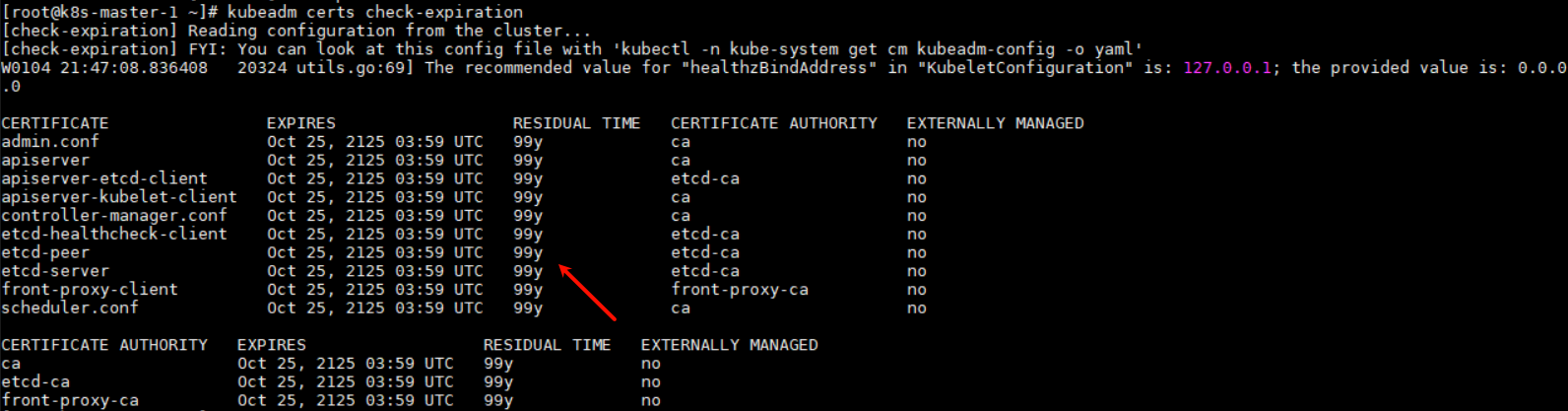
3)查看集群签发的证书时间
kubeadm certs check-expiration
4)重置集群
当你想清理K8s集群时,使用sealos reset一条命令直接卸载,亲测非常好用!
# 完全清理K8s集群环境
sealos reset
END

非特殊说明,本博所有文章均为博主原创。
如若转载,请注明出处:https://www.qiuyl.com/xueyw/574








Abutogel: <a href=" https://abutowin.icu/# ">S...